 StrategyNodes
Comparison
TradingView Pine vs no-code backtesting: which should you use?
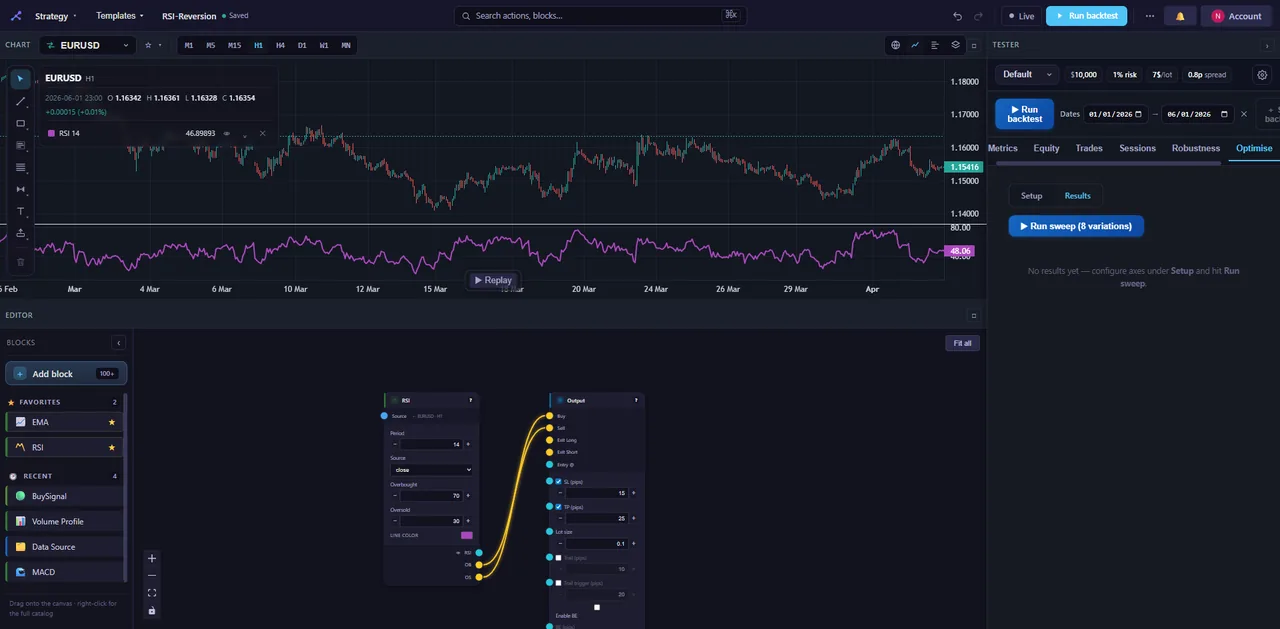
Both Pine Script and no-code tools can turn a trading idea into a tested strategy. The real question isn't which one wins in the abstract. It's how you want to spend your hours, and what you need to be sure of before you risk a cent.
If you use TradingView, you've probably hit the moment where an idea is crystal clear in your head but turning it into a working, testable strategy feels like a second job. That's a fair feeling, and it doesn't make Pine bad. It makes it a trade-off worth thinking through. What follows tries to be honest about both sides: credit where Pine earns it, friction where it shows up, and where a visual, no-code approach simply works differently.
What Pine Script is genuinely great at
Start with the obvious. TradingView is excellent, and Pine Script is a big part of why.
Charting. TradingView's charts are among the best anywhere — fast, clean, deeply configurable, available on every device. If your day already lives on a chart, you're somewhere very good.
Flexibility. Pine is a real scripting language. Once you're fluent you can express nearly any logic you can picture: custom indicators, conditional entries, bespoke plots. There's very little you flat-out can't build.
Community. The public library is vast. For a huge range of ideas, someone has already published a script you can read, fork and adapt, and that shared knowledge is genuinely hard to replicate.
Alerts. TradingView's alerting is mature and reliable, and it plugs into a wide ecosystem. When you want a signal to actually reach you, this is a strong place to be.
Pine isn't the problem. For a trader comfortable writing code, it's one of the most capable tools going. The friction lives at the border between "I have an idea" and "I have working code."
Where Pine's friction shows up
None of this is a knock on Pine. These are real fit-and-effort trade-offs, and they land harder on some traders than others.
It's code. If you don't program, there's a real learning curve — syntax, types, the series-versus-value mindset, the function quirks. All learnable, all a genuine investment of hours before your first strategy behaves the way you meant it to.
Debugging takes time. A misplaced reference or a subtle logic slip can have you reading line by line. Veterans shrug it off; newcomers can lose an evening to a single bug.
Repainting. The way historical and live bars get evaluated trips up a lot of people. A script can look brilliant on history and behave differently in real time — not because Pine is broken, but because understanding repainting takes time, and it bites those who don't yet know to watch for it.
Strategy-tester limits. The built-in tester is useful, but some traders reach its edges, particularly around realistic cost modelling and robustness work. Walk-forward and Monte Carlo aren't first-class features, so rigorous validation often means extra effort or outside tooling.
Symbol-first workflow. Pine and TradingView organise around the chart and its symbol. That's intuitive — but testing one idea across many markets at once asks more of you.
What a no-code approach does differently
StrategyNodes starts from a different place. Instead of writing code, you drag blocks onto a canvas and wire them together. There are 157 blocks across nine categories, including native market-structure and SMC blocks — order blocks, fair-value gaps, liquidity sweeps, supply/demand zones — plus multi-timeframe alignment. You build logic by connecting it, not by typing it. No Pine, no MQL5, no Python.
That shifts a few things beyond just "no code":
- Realistic backtests by default. Spread, commission and slippage are part of the model, with intrabar M1 fills, pyramiding, partial exits and pending orders. (More in our guide to backtesting without coding.)
- A robustness suite, not a lone equity curve. Monte Carlo, walk-forward, parameter sweeps and cross-market testing are built in — the checks that separate a result that held up from one that got lucky. (Why backtests lie goes into why that matters.)
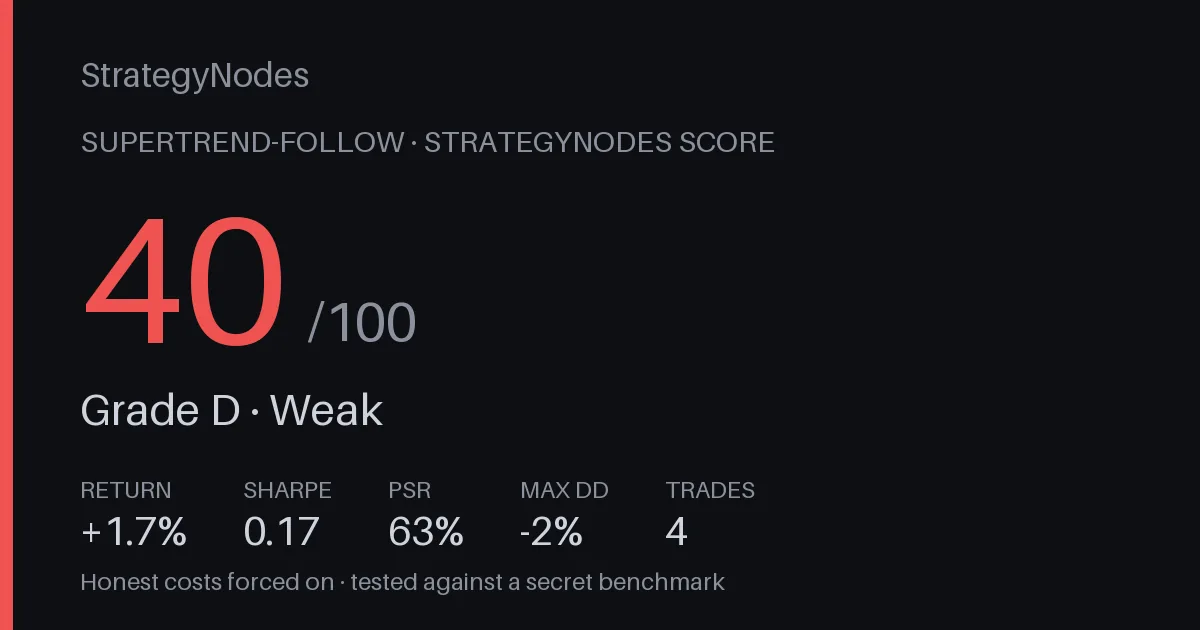
- A StrategyNodes Score that flags overfitting. The Score is a 0–100 number plus a grade, built from the Probabilistic and Deflated Sharpe, a cross-market holdout and honesty checks. It pushes back when a strategy looks too good to be true. (The statistics are in our PSR piece.)
- Multi-asset from the start. Forex, stocks and crypto share one builder, so testing an idea across markets is the normal flow rather than a special project.
Not advice. StrategyNodes is a research and education tool, not a signal service or a promise of profit. A good Score means a strategy survived some serious scrutiny — not that it will make money. Past performance is not indicative of future results.
So which is right for you?
It comes down to how you like to work and what you're optimising for. The even-handed version:
Pine shines when…
- you're comfortable writing code, or you want to learn it — Pine is a genuinely useful skill;
- your workflow is chart-first and you live inside TradingView all day;
- you want open-ended flexibility and don't mind building the scaffolding yourself;
- you lean on the community library and enjoy reading and forking scripts;
- best-in-class charting and mature alerts sit at the centre of how you trade.
No-code shines when…
- you'd rather spend your time on the idea than on syntax and debugging;
- you want realistic costs, walk-forward and Monte Carlo without wiring them up yourself;
- you want a built-in check that actively looks for overfitting;
- you think in market structure and want order blocks, FVGs and liquidity as native blocks;
- you test across forex, stocks and crypto and want one consistent workflow.
Neither list is a verdict. A coder who loves TradingView's charts has every reason to stay in Pine. A discretionary trader who dreads syntax has every reason to build visually. Most people lean one way — not everyone, and that's fine.
The good news: you don't actually have to choose
Here's the part that usually gets missed. StrategyNodes exports to TradingView Pine and MetaTrader MQL5 — one click, code that reproduces the strategy you built, yours to keep. So the two tools aren't strictly rivals.
A practical workflow looks like this: design the idea visually in StrategyNodes, stress-test it with the robustness suite, check the Score for overfitting — then export clean Pine and run it on TradingView's charts with TradingView's alerts. Validation up front, the charting and alerting you already love on the back end. The details are in our export documentation.
The takeaway: build and validate where it's fast and rigorous, then export to Pine to keep using the charts and alerts you already trust. Design here, trade there.
If you'd rather feel the difference than read about it, you can try it free, no signup — build a strategy, run a backtest, see the Score on something of your own, then export it back to TradingView. Whichever way you lean, the goal's the same: less time fighting tools, more time finding out whether an idea actually holds up.
Design here, trade on TradingView
Build and validate a strategy with no code, get a StrategyNodes Score, then export clean Pine or MQL5 you own. No signup to try.
Open the builder →